
Marketing attribution for small business that reports cost per qualified lead
Most tools show you leads. We show you what those qualified leads actually cost by source, so you know where next month's budget should go. The tracking pixel ships underneath the funnel builder, which means attribution works from your first published funnel with zero configuration.
Unlimited users on every plan. Cancel any time. Built in the UK.
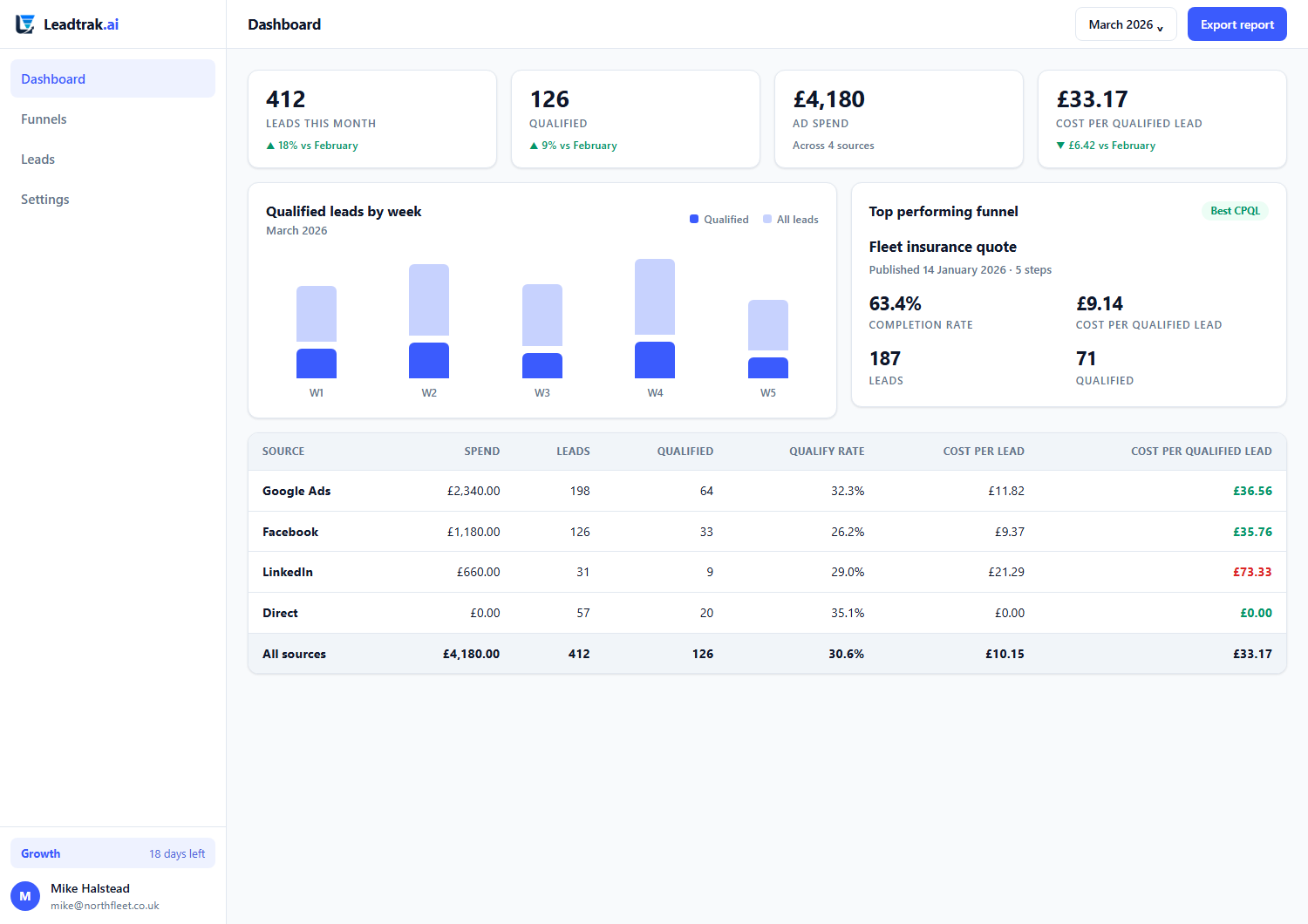
The ROI dashboard — spend, leads, qualified leads and cost per qualified lead by source.
The problem
A form tells you thirty people enquired. It cannot tell you which ad paid for them.
That is the gap every small business hits. You can see spend in one place, leads in another, and never the two joined honestly.
Leads without cost are half a story
Thirty enquiries sounds good until you learn nineteen came from one campaign at £9 each and eleven came from another at £74 each — and the expensive ones never buy. Without cost per qualified lead, you are optimising for volume and paying for it.
Qualified is the word that changes everything
Counting all leads flatters the source that spams enquiries and hides the source that sends three serious buyers. Cost per qualified lead uses your scoring weights to decide what counted, so the number reflects revenue, not noise.
How attribution works
From ad click to a number you can move budget on
No tagging project, no analytics consultant, no configuration call. The measurement is built into the thing you were already building.
The pixel ships with the builder
Every funnel you publish carries the tracking pixel underneath it. Attribution is not a feature you switch on later; it is part of the funnel from the first draft.
Spend goes in by entry or CSV import
Record ad spend against a date, source and campaign, or import a CSV straight out of your ad platform. Source names are normalised, so "Google Ads", "AdWords" and "google" all land in the same bucket instead of splitting into three useless rows. Automatic ad-platform connectors are not built yet.
Leads match back to the click
Each enquiry is tied to the source and campaign that produced it. The join is made on the lead itself, not inferred from a last-click guess that breaks the moment a cookie is cleared.
Qualification decides what counted
The funnel's scoring weights determine which leads were qualified. Spend is divided by qualified leads, not raw submissions, so the cost figure means something.
Cost per qualified lead, by source
The ROI report shows cost per qualified lead broken down by source, and the same figure leads your dashboard the moment you log in. It is the one number that tells you where to put next month's budget.
Honest about the limits
Attribution is a model, not a ledger, and we say so. We show you the method and the confidence, so you can act on the trend without mistaking an estimate for a receipt.
The visitor journey
Open a lead and see every step that led to it
Attribution is only trustworthy if you can audit it. Every lead page carries a Their journey table: each page view and each funnel step recorded for that visitor, oldest first, with the source and campaign carried on each one.
The funnel records itself
A published funnel emits three touchpoints on its own: opened the funnel, completed a step and submitted the funnel. They are written on the server after each answer is safely stored, so they are recorded even when a visitor has JavaScript turned off — and never before the data they describe is durable.
One identity, not two
The visitor id the tracker sets on the first page view is the same id carried through the funnel and stamped on the lead. That is what makes the join possible at all: an ad click and a form submission an hour later are the same person, not two unrelated rows.
Four models, switched on the page
Every lead is credited under first touch, last touch, linear and position-based at the moment it converts, so changing model on the lead page is a click, not an overnight recalculation. First touch tells you what created the demand; last touch tells you what closed it; the truth is usually between them, which is the point of having all four.
Switch the model, the ROI report recalculates
The ROI dashboard carries the same four-model switcher. Choosing one rewrites the whole by-source table: credited leads, credited qualified leads, cost per lead and cost per qualified lead all move together. Google can be your cheapest source under first touch and your most expensive under last touch — seeing both, on one page, one click apart, is the point.
Fractions of a lead, on purpose
Under linear, a lead that touched Google twice and arrived direct once gives Google 0.67 of a lead, not one and not none. The dashboard shows the fraction rather than rounding it up, because rounding is how every source ends up claiming the same conversion and your reported cost per lead comes out lower than your bank statement.
The credit always adds up to one lead
Credit is stored as whole integers rather than rounded decimals, so a lead split three ways is 33.3333% / 33.3333% / 33.3334% — adding to exactly one lead, never 0.999999. A test asserts that for every model at every journey length, because attribution that leaks fractions is attribution you cannot reconcile against your ad spend.
A click id is never wasted
A landing URL carrying a gclid or fbclid but no UTM tags is still a paid click. It is recorded as paid search or paid social rather than being dropped into “direct”, which is where most tools quietly lose it.
Direct is a bucket, not a gap
A visit that genuinely says nothing about where it came from is labelled direct and reported as such. It is never silently dropped, because a report that quietly omits a third of your leads is worse than one that admits it does not know.
Phone then laptop is one person
When a lead's email matches an earlier session on another device, the two visitor ids are merged and the earlier touchpoints join the journey — so the ad they saw on their phone still earns its credit when they convert at their desk. Only unclaimed touchpoints are merged, so an earlier lead is never robbed of its own history.
A lookback window you set
Touchpoints older than the window are excluded from the credit split. The default is 90 days: a visit two years ago did not earn today's enquiry, and counting it would make a long-dead campaign look eternally profitable.
What the funnel knew is never overwritten
If the funnel's own landing URL carried a source, that is a first-party fact and it stands. Only the fields that are genuinely missing are filled in from the visitor's history.
Attribution never costs you a lead
All of this runs after the lead row is written, and every part of it fails quietly. A tracking problem can make a journey incomplete. It can never make a lead go missing or show a visitor an error.
Which journey actually converts
The attribution analytics page groups every lead by the ordered path of sources it touched — google → direct, facebook → google → direct — and shows leads, qualified leads, qualification rate and average lead score for each path. Repeats of the same source back to back are collapsed, because four clicks on the same ad is one step in the story, not four.
Cheap leads and good leads are not the same thing
The lead-quality-by-source table shows the average lead score each source is credited with, weighted by attribution credit so a long path cannot let every source claim the whole score. A source can be the cheapest per lead and the worst per pound. Switching the attribution model recalculates the table.
What this one lead cost
Each lead page shows an estimated attributed cost: that lead's share of the month's ad spend for the sources it touched, apportioned by its own credit. Where there is no spend recorded for those sources we show a dash, not a zero — “we spent nothing” and “we do not know” are different answers and only one of them is honest.
Built today, and what is not
| Capability | Status |
|---|---|
| Tracking pixel injected automatically into every published funnel, no configuration | Built |
| Funnel view, step-complete and submit touchpoints, recorded server-side | Built |
| Visitor id carried from the first page view through the funnel onto the lead | Built |
| First-touch source, medium, campaign and landing page adopted onto the lead | Built |
Bare gclid / fbclid resolved to paid search / paid social | Built |
| Full visitor journey shown on the lead page | Built |
| Four attribution models — first touch, last touch, linear, position-based | Built |
| Switching model on the lead page, with the credit shown per touchpoint | Built |
| Switching model on the ROI dashboard, recalculating the whole by-source report | Built |
| Fractional credited leads, credited qualified leads and cost per qualified lead per source | Built |
| Per-tenant lookback window, 90 days by default | Built |
| Cross-device merging when a lead's email matches an earlier session | Built |
| Direct and unknown traffic bucketed explicitly rather than dropped | Built |
| Top converting paths report — leads grouped by the ordered path of sources they touched | Built |
| Lead quality by source — credit-weighted average lead score per source | Built |
| Estimated attributed cost of an individual lead, on the lead page | Built |
| Ad spend entered by hand or imported from CSV | Built |
| Automatic Google Ads and Meta spend connectors | Planned |
| Time-decay and data-driven attribution models | Planned |
| Cross-device stitching by anything other than a matching email address | Planned |
The honest limits: cross-device merging needs a matching email address — there is no probabilistic identity graph, and there will not be one. Ad spend is still entered by hand or imported by CSV, so cost per qualified lead is only as current as your last import. We would rather say that plainly than imply a model we have not built.
Your dashboard
Four numbers, the moment you log in
No report to run and no date range to configure first. The dashboard opens on the figures a business owner actually asks for on a Monday morning.
Leads this week, against last week
The week runs Monday to now in your timezone, not the server's, and it is shown next to the same period last week — "up 34% on last week (31)". If there were no leads last week we say so rather than printing a meaningless percentage.
Conversion this month
The share of this month's leads that reached qualified or won, with the raw counts underneath so you can see what the percentage is made of. Before your first lead lands it shows a dash, not a flattering 0%.
Top funnel this month
Which funnel is doing the work, with its lead count and its qualification rate, linked straight through to that funnel's analytics. Leads captured by API rather than a funnel are listed too, so nothing quietly disappears from the count.
Cost per qualified lead
The same last-30-days figure as the ROI report, computed from one shared definition so the two pages can never disagree. Until you have recorded ad spend it shows a dash and a link to add it — a £0.00 cost per qualified lead would be a lie, not a bargain.
Underneath: where this month's leads came from — every funnel with leads, qualified count and rate — plus leads today, leads this month, wins, live funnels, ad spend and cost per lead, and your five newest leads.
Why small business
The tooling existed. The pricing didn't.
Multi-touch attribution has been a playground for enterprise software charging enterprise prices. Small businesses were left choosing between a free analytics tool that stops at the page view and a platform that costs more than the campaign it measures.
Leadtrak treats cost per qualified lead as a default report, not an add-on. It is included from the Starter plan upward, with the same unlimited-user rule as everything else, so the team that runs the ads can read the result without a licence for a separate BI seat. Figures are shown in your account currency (GBP, USD or EUR today; more currencies are planned).
Cost per qualified lead, by source, updated daily. The number that decides budget — reported honestly, at small-business pricing.
Compare sources side by side — spend versus qualified leads, not guesses.
Questions
The things people ask about attribution
Do I need to set up tracking tags?
No. The tracking pixel ships underneath the funnel builder, so every published funnel feeds attribution automatically. There is no tagging project and no configuration call before your first numbers appear.
What is the difference between cost per lead and cost per qualified lead?
Cost per lead divides spend by every submission. Cost per qualified lead divides it by leads that passed your scoring weights, which is the figure that actually predicts revenue. We report the qualified version because the raw one flatters weak sources.
Which ad platforms connect?
None automatically, yet. Today spend goes in by hand or by CSV import from your ad platform, and Leadtrak normalises the source names so the spend lines up with the leads. Automatic Google and Meta connectors are planned; we will not list them here until they work.
Do I have to run a report to see cost per qualified lead?
No. It is one of the four figures on the dashboard when you log in, over the last 30 days, alongside leads this week, conversion this month and your top funnel. The full ROI report breaks the same number down by source.
Is attribution a guess?
It is a model, and we are explicit about that. We show the method and the confidence interval so you can act on the trend without treating an estimate as a receipt. The leads are real; the join to spend is as precise as your connected accounts allow.
Can I export the data?
Yes. A full REST API is available on paid plans, with read-only API access even on free. You can pull spend, leads and cost per qualified lead into your own warehouse or report.
Find out what your qualified leads actually cost
Thirty days of full Growth access, no credit card, and a permanent free plan waiting at day 31. Attribution starts the moment you publish your first funnel.